Event Handling: Channel vs SharedFlow
In Android, events (side effects) are typically handled using either a channel or a sharedFlow.
Event handling example with channel
private val _effect: Channel<A> = Channel()
val effect = _effect.receiveAsFlow()
Event handling example with sharedFlow
private val _sideEffectFlow: MutableSharedFlow<SE>
val sideEffectFlow: SharedFlow<SE> = _sideEffectFlow.asSharedFlow()
So what is the difference between handling events with SharedFlow vs Channel?
Let's explore the pros and cons of each.
Channel
Pros and Cons
Pros: Can collect events emitted in the background
Cons: Not suitable for having multiple subscribers
Test 1 - Background
MainViewModel
class MainViewModel : ViewModel() {
    private val _channel = Channel<Int>()
    val channel = _channel.receiveAsFlow()

    init {
        viewModelScope.launch {
            repeat(100) {
                Log.d("Channel", "MainViewModel - Send $it")
                _channel.send(it)
                delay(1000)
            }
        }
    }
}
MainActivity
override fun onCreate(savedInstanceState: Bundle?) {
        super.onCreate(savedInstanceState)

        lifecycleScope.launch {
            repeatOnLifecycle(Lifecycle.State.STARTED) {
                viewModel.channel.collect { number ->
                    Log.d("Channel","MainActivity - Collected $number from channel")
                }
            }
        }
        // ...
}
Result
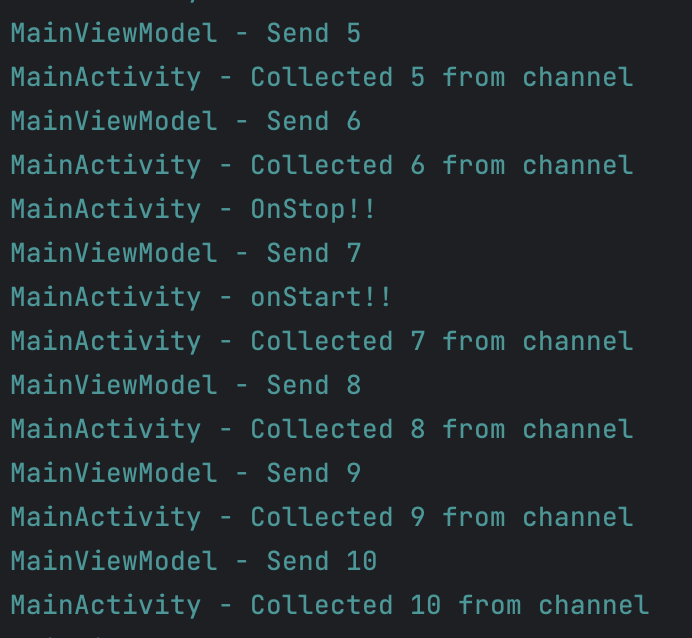
-
MainActivity - onStop (enters background)
-
MainViewModel - channel send 7 (send while in background)
-
MainActivity - onStart (returns to foreground)
-
MainActivity - collect 7 (collect in foreground)
We can see that the value 7 sent in the background was correctly collected.
This is possible because channel's send() suspends the caller while the buffer of this channel is full or if it does not exist. (suspending the caller while the buffer of this channel is full or if it does not exist, or throws an exception if the channel is closed for send (see close for details).)
Test 2 - Multiple Subscribers
MainActivity
lifecycleScope.launch {
            repeatOnLifecycle(Lifecycle.State.STARTED) {
                viewModel.channel.collect { number ->
                    Log.d("Subscriber","Subscriber[1] - Collected $number from channel")
                }
            }
        }

lifecycleScope.launch {
        repeatOnLifecycle(Lifecycle.State.STARTED) {
            viewModel.channel.collect { number ->
                Log.d("Subscriber","Subscriber[2] - Collected $number from channel")
            }
        }
    }
Result
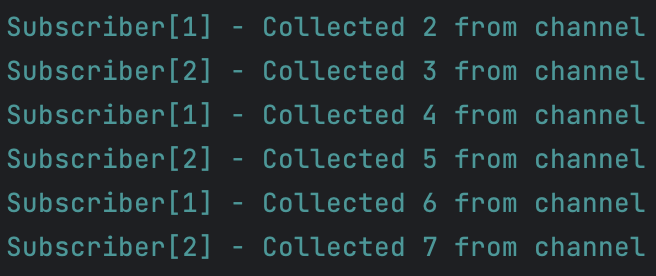
When a Channel has multiple subscribers, each subscriber collects events in alternation.
-
channel - send 1
-
subscriber[1] - collect 1
-
channel - send 2
-
subscriber[2] - collect 2
According to the official documentation, Channel is fair.
Therefore, when there are multiple subscribers, each subscriber does not receive the same event, making SharedFlow more suitable than Channel.
For example, if you need to send a tick to the entire app for periodic data refresh, using Channel would be inappropriate.
sharedFlow
Pros: Can have multiple subscribers
Cons: Cannot collect events emitted in the background
Test 1 - Background
MainActivity
lifecycleScope.launch {
    repeatOnLifecycle(Lifecycle.State.STARTED) {
        viewModel.sharedFlow.collect { number ->
            Log.d("SharedFlow","MainActivity - Collected $number from sharedFlow")
        }
    }
}
Result

-
MainActivity - onStop (enters background)
-
MainViewModel - sharedFlow emit 8, 9, 10, 11 (emit while in background)
-
MainActivity - onStart (returns to foreground)
-
MainActivity - collect 12 (collect in foreground) - 8, 9, 10, 11 are lost
We can confirm that events 8, 9, 10, 11 emitted in the background were lost.
Test 2 - Multiple Subscribers
MainActivity
lifecycleScope.launch {
            repeatOnLifecycle(Lifecycle.State.STARTED) {
                viewModel.sharedFlow.collect { number ->
                    Log.d("Subscriber","Subscriber[1] - Collected $number from sharedFlow")
                }
            }
        }

        lifecycleScope.launch {
            repeatOnLifecycle(Lifecycle.State.STARTED) {
                viewModel.sharedFlow.collect { number ->
                    Log.d("Subscriber","Subscriber[2] - Collected $number from sharedFlow")
                }
            }
        }
Result

Even with multiple subscribers, we can confirm that all subscribers collect the same event.
Overcoming the Drawback
The drawback of sharedFlow can be overcome using the approach described in 6 Ways to Handle Events in MVVM ViewModel ... but then you lose the ability to have multiple subscribers. What does this mean? Let's dive in. (But first, read the 6 Ways to Handle Events in MVVM ViewModel post.)
Problem Scenario
Suppose there is an event object being collected by both AFragment and BFragment.
1.When event is emitted, both AFragment and BFragment collect it. (Assume AFragment collects first by a narrow margin.)

2.At this point, the consumed flag of event in AFragment is set to true.
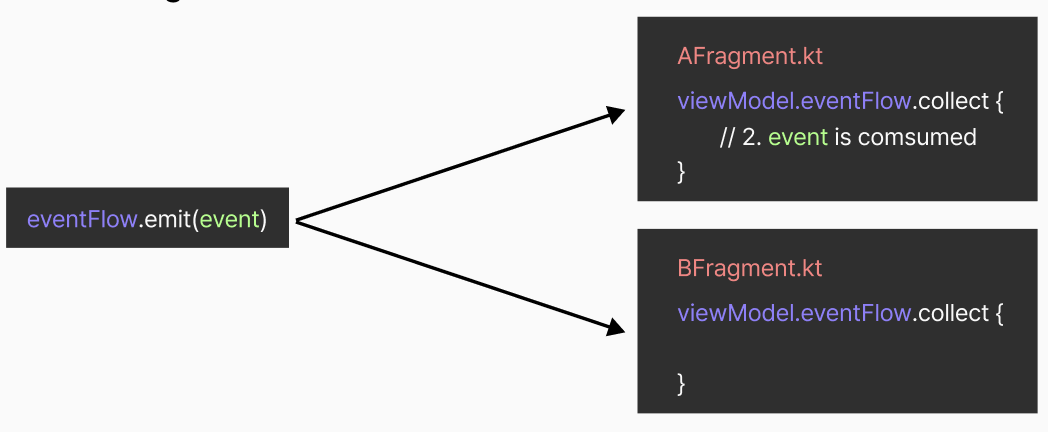
3.After that, BFragment should collect the event, but since it was already consumed, it is not collected.

Solution
I created a HashMap called slotStore.
The key of slotStore contains the name of the current collector and the toString() value of the slot.
The value contains a new event with the same value as the original event.
As before, suppose there is an event object being collected by both AFragment and BFragment.
1. When event is emitted, both AFragment and BFragment collect it. (Assume AFragment collects first by a narrow margin.)
2.At this point, a value like { AFragment + event.toString() : Event(event.value) } is stored in slotStore.

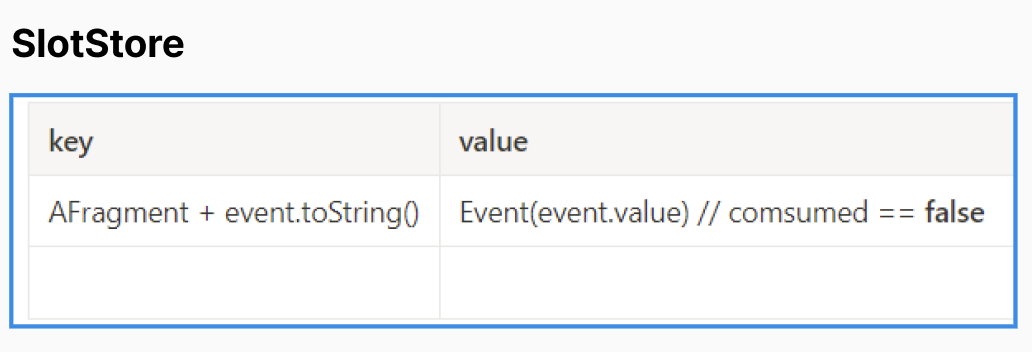
3.After that, the consumed flag of the value in slotStore whose key is AFragment + event.toString() is set to true.
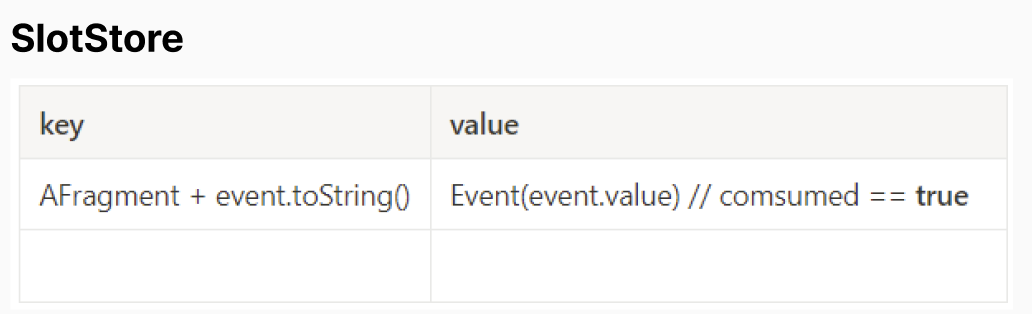
4.The same operation is performed for BFragment.
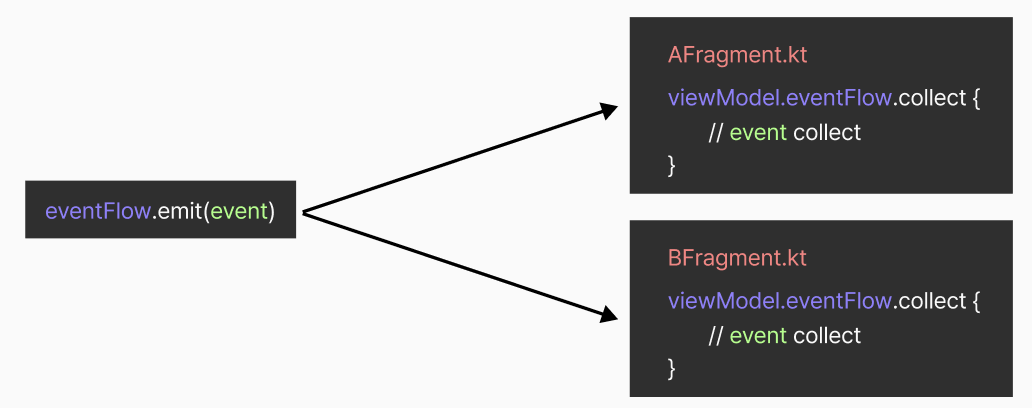
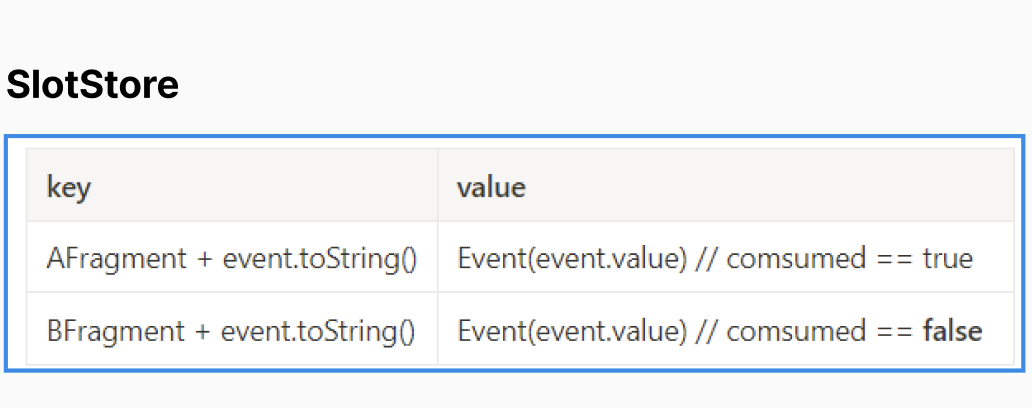
5.After collect, the BFragment's event is marked as consumed.

Using this approach, I solved the issue where only a single subscriber could collect when an EventFlow with two or more subscribers emitted an event.
The code using slotStore can be found here.
Solution - Improvement
There was an issue where Event objects were not garbage collected because slotStore kept referencing them even after they were no longer in use. I implemented it using an ArrayDeque to store a maximum of 20 EventFlowSlots. The final code is as follows.
private class EventFlowImpl<T>(
    replay: Int
) : MutableEventFlow<T> {

    private val flow: MutableSharedFlow<EventFlowSlot<T>> = MutableSharedFlow(replay = replay)

    private val slotStore: ArrayDeque<Slot<EventFlowSlot<T>>> = ArrayDeque()

    @InternalCoroutinesApi
    override suspend fun collect(collector: FlowCollector<T>) = flow
        .collect { slot ->

            val slotKey = collector.javaClass.name + slot

            if(isContainKey(slotKey)) {
                if(slotStore.size > MAX_CACHE_EVENT_SIZE) slotStore.removeFirst()
                slotStore.addLast(Slot(slotKey, EventFlowSlot(slot.value)))
            }

            val slotValue = slotStore.find { it.key == slotKey }?.value ?: slot

            if (slotValue.markConsumed().not()) {
                collector.emit(slotValue.value)
            }
        }

    override suspend fun emit(value: T) {
        flow.emit(EventFlowSlot(value))
    }

    fun isContainKey(findKey: String): Boolean {
        return slotStore.find { it.key == findKey } == null
    }
}

private data class Slot<T>(
    val key: String,
    val value: T
)
Conclusion
Events (side effects) are typically handled in only one place.
Using sharedFlow to handle background events requires creating an eventFlow. Creating an eventFlow itself has the downside of requiring additional code. Moreover, the moment you create an eventFlow, you lose the advantage of sharedFlow (the ability to have multiple subscribers). This can also be solved using the approach described above. However, it requires additional code and the code is not easy to understand.
Therefore, since events are usually handled in one place, using channel to receive events requires the least code and is relatively easy to understand.
I believe it's best to use sharedFlow only when specifically needed.
References
[Kotlin] Coroutine's SharedFlow and Channel
